
Download Ninja Outreach – Blogger Outreach, Influencer Marketing, SEO Tool
Overview
Ninja Outreach is a specialised outreach and relationship‑management tool designed for bloggers, marketers and enterprises that need a streamlined way to connect with prospects across multiple social channels. Built with a clean, user‑friendly interface, Ninja Outreach consolidates the chaotic process of finding influencers, sending personalised pitches, and tracking responses into one secure dashboard. Whether you are running a content‑marketing campaign, looking for guest‑post opportunities, or trying to amplify brand mentions on Twitter, LinkedIn or Instagram, the platform provides real‑time analytics that show how your outreach messages are performing, which connections are engaging, and where you should focus your next effort. The software’s core promise is to turn time‑consuming manual outreach into an automated, data‑driven workflow, helping you increase visibility, drive traffic, and ultimately generate more qualified leads without the typical guesswork.
The tool also integrates with popular CRM systems, enabling seamless transfer of contact information and lead status updates. By centralising outreach data, Ninja Outreach eliminates the need for multiple spreadsheets, email threads, and fragmented notes. Security is a top priority – all data is encrypted both at rest and in transit, and the platform complies with GDPR and CCPA standards, giving you peace of mind when handling personal information. For agencies managing dozens of client campaigns, the multi‑user permission system allows you to assign roles, set limits, and monitor activity logs, ensuring accountability across teams. In short, Ninja Outreach is positioned as a “one‑stop shop” for anyone serious about building high‑quality backlinks, securing guest‑post placements, or establishing lasting influencer partnerships.
Key Features
- Advanced prospect search with filters for niche, domain authority, social reach, and engagement metrics.
- Automated, fully customisable email and direct‑message templates with dynamic placeholders.
- Multi‑channel outreach support – Twitter, LinkedIn, Instagram, and email.
- Real‑time analytics dashboard showing open rates, reply ratios, and link acquisition stats.
- CRM integration (HubSpot, Salesforce, Pipedrive) for seamless lead syncing.
- Team collaboration tools – role‑based access, activity logs, and shared outreach queues.
- Bulk import/export of contacts via CSV or Google Sheets.
- GDPR‑compliant data handling and end‑to‑end encryption.
- Scheduled outreach campaigns with time‑zone aware sending.
- AI‑powered suggestion engine that recommends high‑value prospects based on your past successes.
Installation & Usage Instructions
Getting started with Ninja Outreach is intentionally simple, whether you are a solo blogger or part of a large marketing department. First, visit the official website and click the “Download” button for your operating system – the tool is offered as a web‑based SaaS solution, so there is no heavy client install required. After you register with a professional email address, you’ll receive a secure activation link. Follow the link, set a strong password, and you’ll be taken to the onboarding wizard.
The wizard guides you through three critical steps: (1) connecting your social accounts (Twitter, LinkedIn, Instagram) via OAuth; (2) importing existing contacts using a CSV template or connecting directly to your CRM; and (3) selecting a campaign goal (e.g., guest post outreach, backlink acquisition, influencer partnership). Each step includes on‑screen tips and video tutorials that explain the nuances of field mapping and permission scopes.
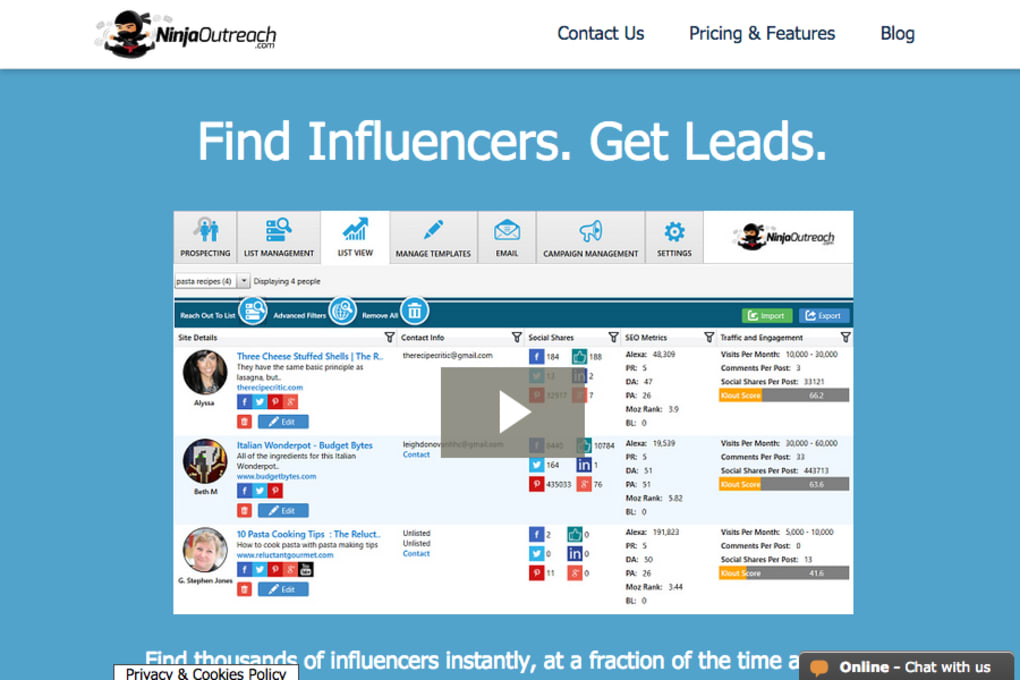
Once the setup is complete, you can start building prospect lists using the built‑in search engine. Apply filters such as “Domain Authority > 40” or “Twitter followers > 5k” to narrow down the most relevant targets. After curating a list, click “Create Outreach Sequence” and choose from pre‑made templates or design your own. Ninja Outreach’s dynamic placeholders let you insert the prospect’s name, blog title, or recent tweet automatically, ensuring each message feels personal.
When you launch a campaign, the platform queues the messages based on your preferred sending schedule. You can monitor delivery status in the “Outreach Dashboard,” where real‑time graphs display open rates, click‑throughs, and replies. If a prospect replies, the conversation thread appears directly within the app, allowing you to continue the dialogue without switching to external email clients. You can also tag contacts with custom labels (e.g., “Hot Lead,” “Follow‑Up”) and set reminders for follow‑up actions. The built‑in reporting tools let you export performance data as PDF or CSV for client presentations or internal reviews.
For teams, the “Team Settings” panel lets administrators invite members, assign roles (Admin, Manager, Contributor), and define permission levels. Activity logs capture every action taken by each user, providing full auditability. Should you need help, the support centre offers live chat, a knowledge base, and a community forum where power users share best practices and outreach scripts.
Compatibility
Ninja Outreach is built as a cloud‑native SaaS platform, which means it runs on any modern web browser—Chrome, Firefox, Safari, or Edge—on Windows 10/11, macOS Monterey or later, and most Linux distributions. Because the interface is fully responsive, you can also access the dashboard from mobile devices running Android 8.0+ or iOS 13+. While there is no native desktop client to download, the web app is optimized for low‑latency performance, and the underlying infrastructure scales automatically to handle large outreach volumes without slowdown.
For organisations with strict IT policies, Ninja Outreach offers a single‑sign‑on (SSO) integration via SAML 2.0, allowing you to use existing corporate identity providers such as Okta, Azure AD, or OneLogin. The platform also supports two‑factor authentication (2FA) via authenticator apps, adding an extra layer of security for user logins. API access is provided through RESTful endpoints, enabling developers to build custom integrations or pull campaign metrics into internal dashboards.
Pros and Cons
Pros
- All‑in‑one outreach solution that saves time and reduces manual errors.
- Powerful search filters and AI suggestions help you find high‑quality prospects quickly.
- Multi‑channel support (Twitter, LinkedIn, Instagram, email) expands your outreach reach.
- Real‑time analytics give immediate insight into campaign performance.
- Robust team collaboration features and role‑based permissions for agencies.
- GDPR‑compliant data handling and end‑to‑end encryption ensure security.
- Easy integration with leading CRMs and SSO providers.
Cons
- Pricing may be steep for freelancers or small blogs on a limited budget.
- Learning curve for advanced features such as API usage and custom workflow automation.
- Heavy reliance on internet connectivity; offline work is not supported.
- Limited template library compared to some niche guest‑post tools.
Frequently Asked Questions
Is Ninja Outreach a free tool?
Ninja Outreach offers a 7‑day free trial with full feature access, but after the trial period a paid subscription is required. Plans start at $99 per month for solo users and scale up for teams.
Can I use Ninja Outreach on my mobile phone?
Yes. The web app is fully responsive and works on Android and iOS browsers. While there is no native mobile app yet, the mobile experience mirrors the desktop dashboard.
Does Ninja Outreach integrate with my existing CRM?
It integrates natively with HubSpot, Salesforce, Pipedrive, and Zoho CRM. You can also use Zapier to connect with other services not listed directly.
How secure is my data in Ninja Outreach?
All data is encrypted in transit (TLS 1.3) and at rest (AES‑256). The platform complies with GDPR, CCPA, and provides detailed audit logs for admin users.
What support options are available?
Ninja Outreach offers 24/7 live chat, email support, a comprehensive knowledge base, and a community forum. Premium plans receive priority response times and a dedicated account manager.
Conclusion & Call‑to‑Action
If you’re a blogger, marketer, or agency looking to supercharge your outreach efforts, Ninja Outreach delivers a robust, data‑driven platform that consolidates prospect discovery, personalized messaging, and performance analytics into a single, secure environment. Its multi‑channel capabilities and AI‑powered suggestions make it stand out from generic email‑automation tools, while the team‑centric features keep larger organisations organized and accountable. Although the price point may be a hurdle for hobbyists, the productivity gains and higher conversion rates typically justify the investment for serious professionals. Ready to experience a more efficient way to build backlinks, secure guest posts, and nurture influencer relationships? Download Ninja Outreach today, start your free trial, and watch your outreach results soar.



.png)



